
Hands-on Base Example
PharmaAuthZFlow Example
The PharmaAuthZFlow example demonstrates how Permguard enforces authorization across the distinct trust boundaries of a pharmacy ecosystem.
It shows how users, workloads, and roles interact within a Zero Trust authorization model.
The example is intentionally simplified to highlight core authorization concepts across three main domains:
Platform-Administration Domain Manages the pharmacy franchise: branches, teams, roles, and administrative operations.
Operations-Management Domain Handles operational workflows: medication orders, fulfillment, stock levels, inventory and logistics.
Patient-Services Domain Covers clinical workflows: patients, prescriptions, medication requests, dispensing, appointments, and notifications.
Each domain represents its own bounded context (trusted boundary). In real-world environments, these domains would likely be further segmented, but here we keep the model intentionally simple.
Therefore, each domain requires its own Permguard zone and a root ledger for managing policies.
Before proceeding, ensure the CLI is installed and the AuthZServer is running.
Creating the Zones and Ledgers
The first step is to segment the trust boundaries using Permguard zones, and create a dedicated ledger for each one.
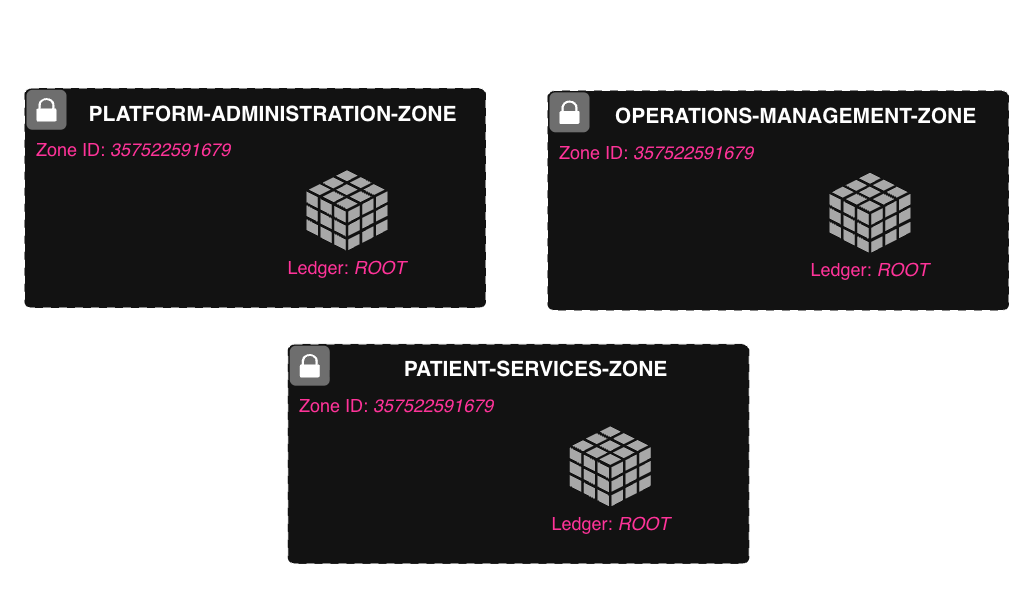
Permguard conventionally names the main ledger of a zone root, representing the primary policy store of that zone.
Let’s create the zones and their root ledgers:
permguard zones create --name platform-admin-zone
permguard authz ledgers create --name root --zone-id 836576733282
permguard zones create --name pharmacy-management-zone
permguard authz ledgers create --name root --zone-id 121820121075
permguard zones create --name patient-services-zone
permguard authz ledgers create --name root --zone-id 927579003246
Captured output.
❯ permguard zones create --name platform-admin-zone
836576733282: platform-admin-zone
❯ permguard authz ledgers create --name root --zone-id 836576733282
9c08015ca0fe46e9b0b54179cbd22bf3: root
❯ permguard zones create --name pharmacy-management-zone
121820121075: pharmacy-management-zone
❯ permguard authz ledgers create --name root --zone-id 121820121075
a0d10339102c4690a8c13a01ac60cd74: root
❯ permguard zones create --name patient-services-zone
927579003246: patient-services-zone
❯ permguard authz ledgers create --name root --zone-id 927579003246
b811788cde40438d90f062b9d5a7fd2c: root
Use Cases, Roles, and Architectural Components
In this example, we implement two main use cases:
- Branch Management
- Prescription and Medication Order Flow
Each use case spans multiple roles, services, and trusted zones within the PharmaAuthZFlow architecture.
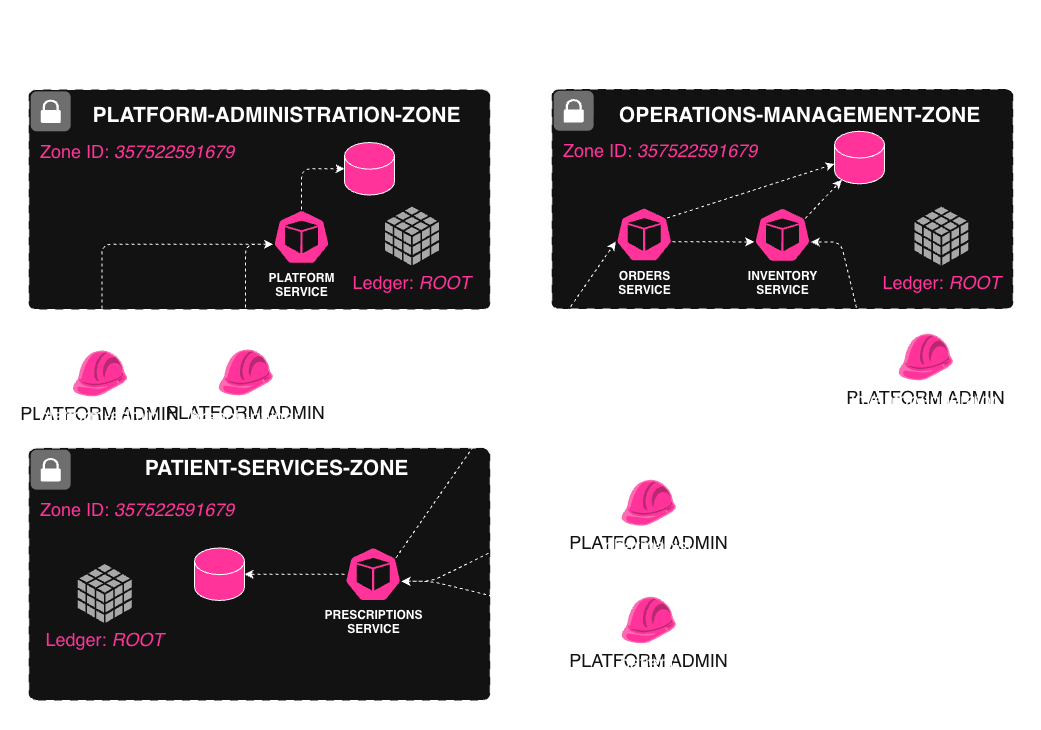
Although this example uses explicit roles (e.g. platform-admin, branch-owner, pharmacist) for clarity, Permguard is not limited to role-based access control (RBAC).
In real-world deployments it is possible to model rich authorization using ABAC. PharmaAuthZFlow is therefore a didactic example, not a limitation of what Permguard can express or enforce.
1. Branch Management
This use case covers the administrative workflow of creating and managing pharmacy branches, teams, and roles.
Description
- A Platform Admin creates a new branch.
- The Platform Admin assigns a Branch Owner to that branch.
- The Branch Owner configures the local team and assigns roles such as pharmacist or inventory-operator.
Roles
| Role | Description |
|---|---|
platform-admin | Manages global franchise-level operations |
branch-owner | Manages branch-level team and role assignments |
Services & Zones
| Zone | Service | Purpose |
|---|---|---|
platform-administration-zone | platform-service | Branch creation, user/role assignment |
2. Prescription & Medication Order Flow
This use case covers the clinical workflow from prescription creation to medication ordering and stock verification.
Description
- A Patient submits a prescription request through the Prescriptions Service.
- A Pharmacist reviews and validates the prescription.
- Once validated, the Prescriptions Service initiates a medication order by calling the Orders Service.
- The Orders Service checks item availability by querying the Inventory Service and temporarily reserves (locks) the medication.
- The Inventory Operator, via the Inventory Service, reviews stock levels and, if needed, creates a replenishment order.
Roles
| Role | Description |
|---|---|
patient | Requests prescriptions |
pharmacist | Validates prescriptions and places medication orders |
inventory-operator | Verifies stock and handles inventory ordering |
Services & Zones
| Zone | Service | Purpose |
|---|---|---|
patient-services-zone | prescriptions-service | Handles prescription submissions |
operations-management-zone | orders-service | Orders medications from suppliers |
operations-management-zone | inventory-service | Checks and updates medication inventory |
Workspace Setup & Policy apply for the Platform Administration Zone
In this step, the workspace is set up.
A workspace represents a local working space. Plese refer to the CodeOps Workspace section for more information about the workspace.
mkdir -p ./platform-administration-zone && cd ./platform-administration-zone
permguard init --authz-language cedar
permguard remote add origin localhost
permguard checkout origin/836576733282/root
Captured output.
permguard remote add origin localhost
permguard checkout origin/836576733282/pharmaauthzflow
Initialized empty permguard ledger in '.'.
Remote origin has been added.
Ledger pharmaauthzflow has been added.
The local workspace is already fully up to date with the remote ledger.
Next, policies need to be created and applied to the root ledger of the platform-administration-zone.
The very first step is to checkout the correct zone and ledger.
cat << EOD > platform-policies.cedar
@id("branch-administration")
permit(
  principal == Permguard::Identity::Attribute::"role/platform-admin",
  action in [ PharmaAuthZFlow::Platform::Action::"view", PharmaAuthZFlow::Platform::Action::"create",
    PharmaAuthZFlow::Platform::Action::"update", PharmaAuthZFlow::Platform::Action::"delete"],
  resource is PharmaAuthZFlow::Platform::Branch
);

@id("branch-team-management")
permit(
  principal == Permguard::Identity::Attribute::"role/branch-owner",
  action == PharmaAuthZFlow::Platform::Action::"assign-role",
  resource is PharmaAuthZFlow::Platform::Branch
);
EOD
Captured output.
permguard checkout origin/836576733282/pharmaauthzflow
Initialized empty permguard ledger in '.'.
Remote origin has been added.
Ledger pharmaauthzflow has been added.
The local workspace is already fully up to date with the remote ledger.
At this stage it is time to apply changes to the root ledger of the platform-administration-zone.
permguard applyCaptured output.
❯ permguard apply
Initiating the planning process for ledger head/836576733282/9c08015ca0fe46e9b0b54179cbd22bf3.
Planning process completed successfully.
The following changes have been identified and are ready to be applied:

        + / ef296a36b9fbb2186a38585b3fe8e1bd56337b64b8543fb5aaacbaf9f431b295 branch-administration
        + / 417e4d33217b7a27dc175c4942ac84c9c8df77b780cce99114dc28b8c46f2092 branch-team-management

unchanged 0, created 2, modified 0, deleted 0

Initiating the apply process for ledger head/836576733282/9c08015ca0fe46e9b0b54179cbd22bf3.
Apply process completed successfully.
Your workspace is synchronized with the remote ledger: head/836576733282/9c08015ca0fe46e9b0b54179cbd22bf3.
Policies have now been applied and it is time to perform an authorization check.
Plese refer to the Command Line section for more information about the available commands.
cat << EOD > authz-request.json
{
  "authorization_model": {
    "zone_id": 836576733282,
    "policy_store": {
      "kind": "ledger",
      "id": "9c08015ca0fe46e9b0b54179cbd22bf3"
    },
    "principal": {
      "type": "workload",
      "id": "spiffe://edge.example.com/workload/64ad91fec7b0403eaf5d37e56c14ba42",
      "source": "spire"
    }
  },
  "request_id": "1f12378d138e4c75b70d7cfa32345d39",
  "subject": {
    "type": "attribute",
    "id": "role/branch-owner"
  },
  "resource": {
    "type": "PharmaAuthZFlow::Platform::Branch",
    "id": "fb008a600df04b21841c4fb5ad27ddf7"
  },
  "action": {
    "name": "PharmaAuthZFlow::Platform::Action::assign-role"
  }
}
EOD
permguard authz check ./authz-request.json -o jsonHere’s what gets returned.
❯ permguard authz check ./authz-request.json -o json  | jq
{
  "authorization_check": {
    "request_id": "1f12378d138e4c75b70d7cfa32345d39",
    "decision": true,
    "context": {
      "id": "c93bee3ea953415394523737043c065d"
    },
    "evaluations": [
      {
        "request_id": "1f12378d138e4c75b70d7cfa32345d39",
        "decision": true,
        "context": {
          "id": "c93bee3ea953415394523737043c065d"
        }
      }
    ]
  }
}
Next Steps
This example demonstrates how to set up the PharmaAuthZFlow playground and perform an authorization check.
To better understand Permguard, it is worth exploring the Policy Store, which is implemented as a Ledger. The Ledger uses a Git-like object storage system.
Plese refer to the Command Line Objects section for more information about the available commands.
Below is an example of how to list all objects in the workspace.
permguard objects --allOutput shown below.
❯ permguard objects --all
Your workspace objects:

	- 174cfcdf230d433b471839dd2e89776b3babd2eca67b8c11c842013c9ca08ff8 tree
	- 1fa8f770b18e483f662fb3692e6b7bdb54c64a1d071b73c7971a18aa6737bcb1 blob platform-administration
	- e7767c3b7087e0a1f6d6daec7d14708a9007583708d41afc950e5ea33b91b428 commit
	- bbf799626c4be6f2089d188847f28848844ef655df393607a1f568dcff52e653 blob branch-administration

total 4, commit 1, tree 1, blob 2
The following example shows how to display the content of the branch-administration object.
permguard objects cat bbf799626c4be6f2089d188847f28848844ef655df393607a1f568dcff52e653Displayed output.
❯ permguard objects cat bbf799626c4be6f2089d188847f28848844ef655df393607a1f568dcff52e653

Your workspace object bbf799626c4be6f2089d188847f28848844ef655df393607a1f568dcff52e653:

{"annotations":{"id":"branch-administration"},"effect":"permit","principal":{"op":"==","entity":{"type":"Permguard::Identity::Attribute","id":"role/branch-owner"}},"action":{"op":"==","entity":{"type":"PharmaAuthZFlow::Platform::Action","id":"assign-role"}},"resource":{"op":"is","entity_type":"PharmaAuthZFlow::Platform::Subscription"}}

type blob, size 397, oname branch-administration
It is also possible to specify the frontend option to display the object in a more readable format.
permguard objects cat bbf799626c4be6f2089d188847f28848844ef655df393607a1f568dcff52e653 --frontendHere’s the result.
❯ permguard objects cat bbf799626c4be6f2089d188847f28848844ef655df393607a1f568dcff52e653 --frontend

Your workspace object bbf799626c4be6f2089d188847f28848844ef655df393607a1f568dcff52e653:

@id("branch-administration")
permit (
    principal == Permguard::Identity::Attribute::"role/branch-owner",
    action == PharmaAuthZFlow::Platform::Action::"assign-role",
    resource is PharmaAuthZFlow::Platform::Subscription
);

type blob, size 397, oname branch-administration
It is recommended to explore the Policy as Code section to learn more about the policy store and the policy language.
Plese refer to the DevOps section for more information about configuration and deployment.
Finally, it is worth considering how to deploy the AuthZServer.